

Use WorkBuddy models in Pi with headless Magpie and HiRoute
Bring your WorkBuddy models into HiRoute. Route straightforward work to a Regular model and harder decisions to a Primary model, then use the route in Pi or Codex CLI. WorkBuddy supplies the models while your preferred Agent reads files, edits code and organizes research.
Download HiRoute · Browse Agent guides
1. Scan or sign in to get models · 2. Configure smart routing · 3. Connect your Agent · 4. Explore task delegation
1. Scan or sign in to get models
Install the Magpie CLI on the host running HiRoute. Choose the startup method for your system.
- On macOS or Linux with systemd, run
magpie daemon install --no-web, then check the service withmagpie daemon status. Runmagpie daemon startto start an installed service. - On Windows or hosts without service installation, run
magpie servein a separate terminal and keep it running.
If the gateway is already running, go straight to sign-in.
Run magpie plugin add @magpie-community/opencode-workbuddy-auth, then sign in with the command for your account.
- For a CodeBuddy plan in China, run
magpie plugin login workbuddy. - For the international build, run
magpie plugin login workbuddy-ai.
Complete authorization in the browser, then query the catalog and keep the complete IDs you want. Use curl.exe in Windows PowerShell.
curl -fsS -H 'Authorization: Bearer magpie' http://127.0.0.1:3425/v1/models
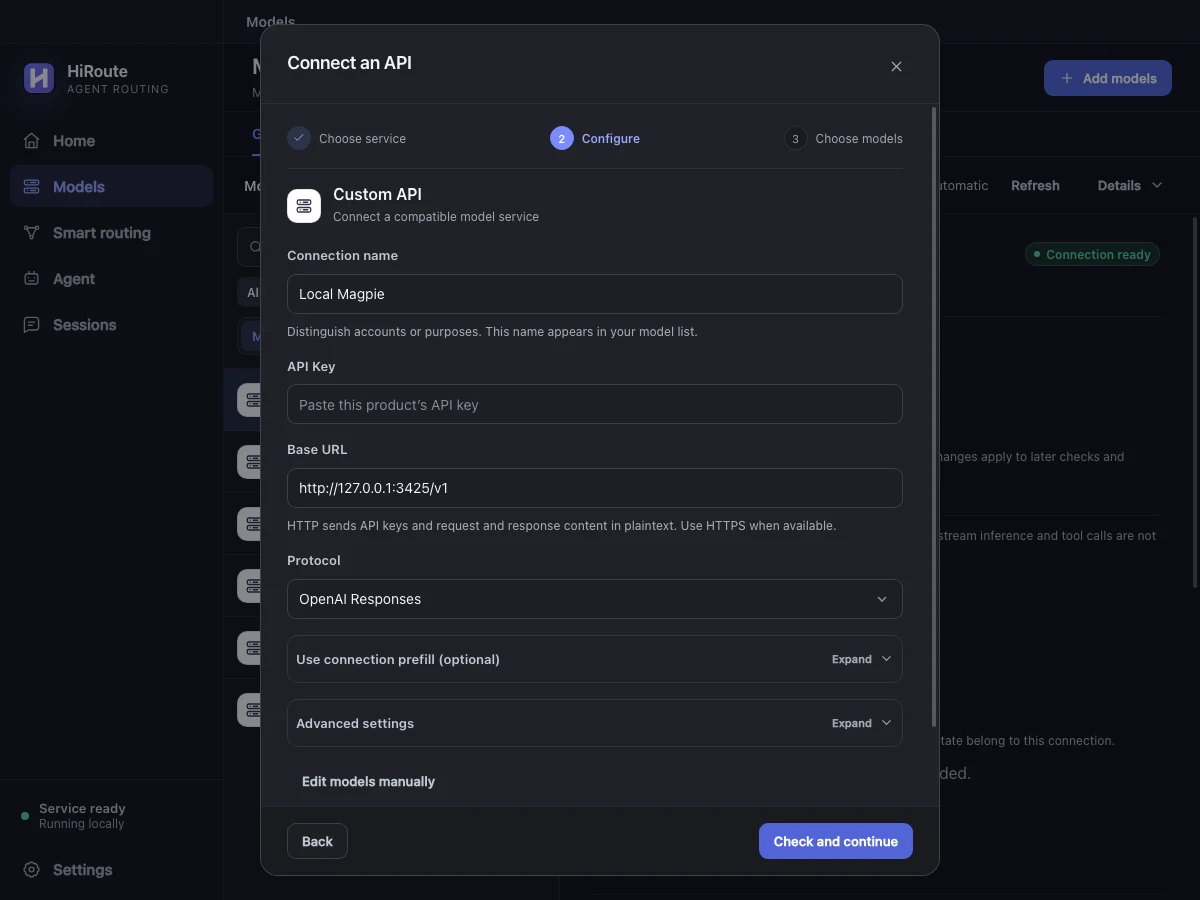
In HiRoute, open Models → General models → Add models → New API connection → Custom API and fill in the connection.
| Setting | Value |
|---|---|
| Connection name | For example, “Magpie WorkBuddy” |
| API base URL | http://127.0.0.1:3425/v1, or your gateway's address |
| Protocol | Responses for the Pi or Codex CLI examples below |
| API key | magpie for the default local gateway, or your configured key |
| Models | Select from the returned catalog, keeping the full source prefix |
Click Check and continue, select models and save. If the catalog does not appear, set the model directory path to /v1/models under Advanced settings, or enter the complete IDs you just retrieved. If a supported Agent configuration already points to this gateway, try Scan this device to find and reuse the connection.
2. Configure smart routing
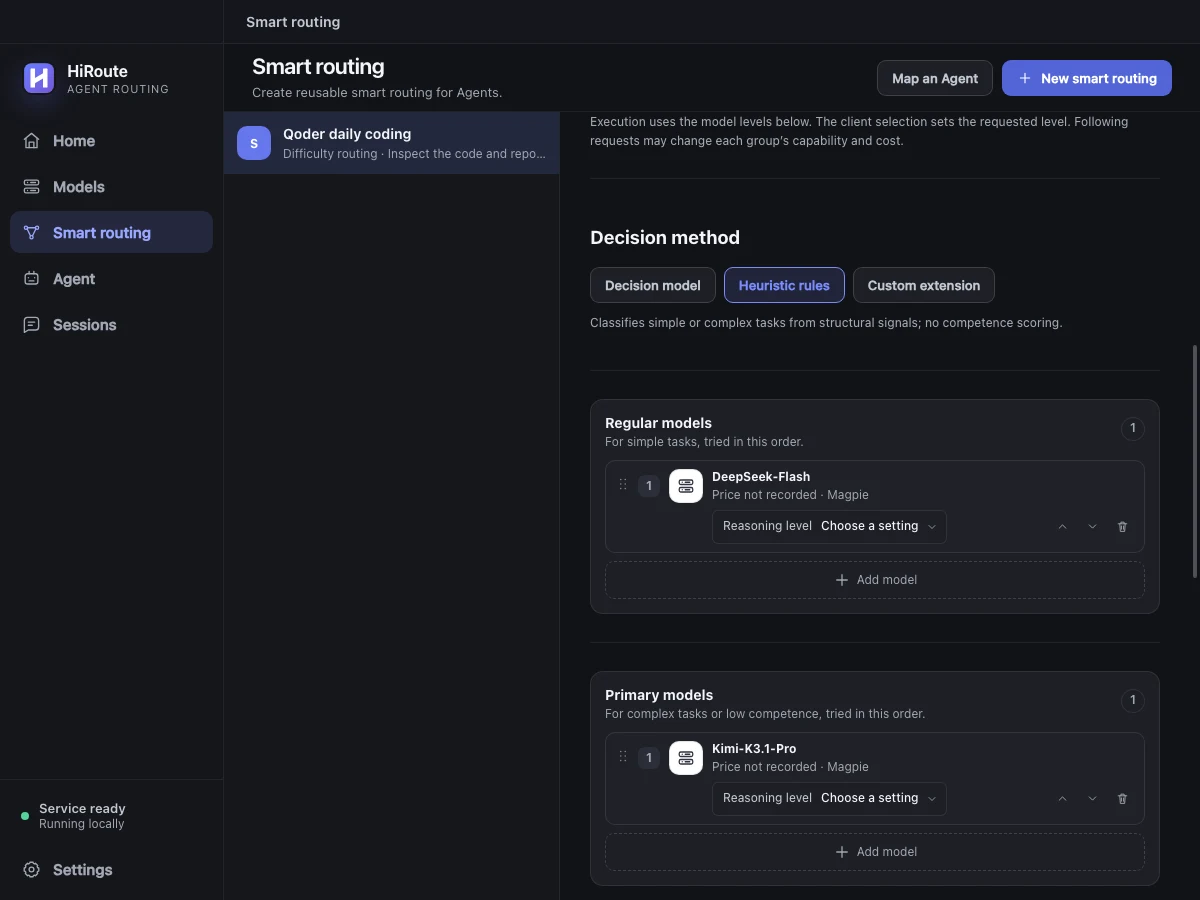
- Open Smart routing → New smart routing, name the plan “WorkBuddy document review” and choose Difficulty routing.
- Click Add model in Regular models and choose a fast or economical model from step 1 for reading files, finding definitions and gathering facts.
- Add a model to Primary models for complex analysis, planning or changes across several files. Combine available models from different subscriptions, APIs or local connections as needed.
- Start with Heuristic rules under Decision method, then click Enable. The published route becomes available in the Agent settings in the next step.
To adjust routing using execution feedback, select a decision model in the same section for stage scoring and low-score protection. Learn about difficulty decisions
3. Connect your Agent
Use WorkBuddy models in Pi
Open Agent → Pi → Model routing and check the “WorkBuddy document review” plan you published. Choose Responses to match the connection and save.
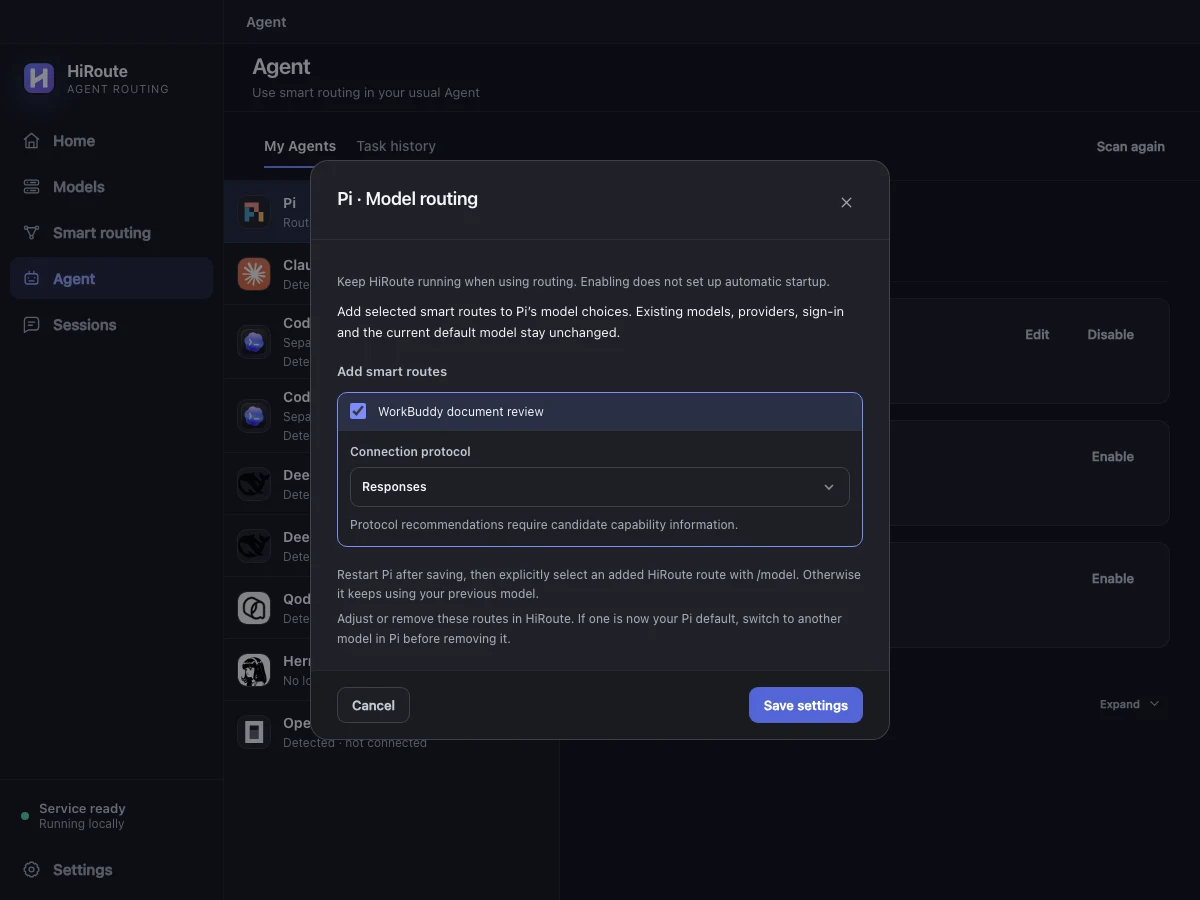
Restart Pi and choose the route with /model. Ask it to extract three takeaways from the project README. The models come from your WorkBuddy connection, and Pi handles actions such as reading files. Inspect the model choices in HiRoute's Sessions → Routing timeline.
You can also select the plan under Agent → Codex → Model routing and launch it with the command from On demand · CLI only. See the illustrated Codex CLI setup.
4. Explore task delegation
While drafting a plan in Codex CLI, have lightweight Pi extract owners, deadlines and open questions from a set of documents. Give Pi an economical WorkBuddy model from step 1. Codex can work from the compact briefing while the WorkBuddy model handles the document reads.
Create a Fixed model route called “Pi document scan” with the WorkBuddy model. Under More settings → Task delegation, allow delegation and choose Pi, describe its purpose and enable it. Turn on Task routing for the main Agent.
Use HiRoute to give these documents to “Pi document scan”. Return owners, deadlines, open questions and source references.
Ask the main Agent to continue from the briefing, then check the executor and usage in task history and the session timeline. Set up lightweight Pi delegation