

Use smart model routing
Smart model routing selects and executes models according to the published configuration. Fixed model and Free first follow candidate order. Difficulty routing and Custom branches judge the task to select a model group and judge again for every new user message. For these two routing types, tool continuations reuse the frozen decision when HiRoute can identify the same turn, history is continuous, and the choice remains reusable.
When a new judgment selects the same group, HiRoute prefers the model from the previous turn if the conversation still matches and the model can serve the request. This includes a backup selected after another model failed, and helps reuse model context and prompt caches. If the group changes or the previous model cannot be reused, normal selection and automatic relay apply. This happens automatically, with no follow-up switching setting.
This guide shows Desktop; the Linux Web UI has the same interface and steps. The CLI exposes the same paths through routing options/list/show/preview/apply and decision services list/apply/test; see Install HiRoute on Linux and HiRoute CLI, and obtain request fields from the installed schema. For a first connection, follow Quickstart to create a fixed route, then add decision models when needed. To let a new model take simple work with a primary model as backup, follow Try a new model.
Choose a routing type
Create or edit a plan in Smart routing, then choose How to use models:
| Type | When to use it | Behavior |
|---|---|---|
| Fixed model | You need a predictable candidate order | Tries candidates in order, skipping models that lack required capabilities or are temporarily unavailable |
| Difficulty routing | You want to lower cost by assigning simple tasks to a cheaper Regular model, with Primary for complex work | Chooses regular or primary using this turn's degree result and any applicable previous-stage score |
| Custom branches | Tasks such as writing and reviewing need different models | Selects a task category, then regular or primary models within that branch |
| Free first | You want free models attempted first | Tries free candidates in a fixed order, then either stops or uses an optional primary fallback |
Models → General models manages models that execute your tasks. Models → Decision models manages connections that judge and assess work, including self-hosted custom extensions. Decision models do not answer the task in place of execution models, and they do not select tools.
Connect a decision model
- Open Models → Decision models and select Add decision model.
- Choose a source under Credentials. Use existing API connection reuses the keys of a connection saved under Models, without entering them again. Configure independently asks you to choose a provider and enter a key for this decision model only. Providers include Bailian (Token Plan or Workspace), OpenAI, OpenRouter, TypeSafe, and Other compatible connection.
- Confirm the model ID, complete URL and protocol, then enter a name. Select Change to edit a prefilled value, or fill in any missing values.
- Select Save and test, or Save only and later Test connection in the saved details.
HiRoute supplies judgment and assessment logic for built-in decision models, so no separate Jev deployment is required.
The Context window is automatic by default and follows the model metadata; you can also set a custom request window. Current input and decision questions take priority, and history uses the remaining space. Advanced: per-question limit caps each question separately.
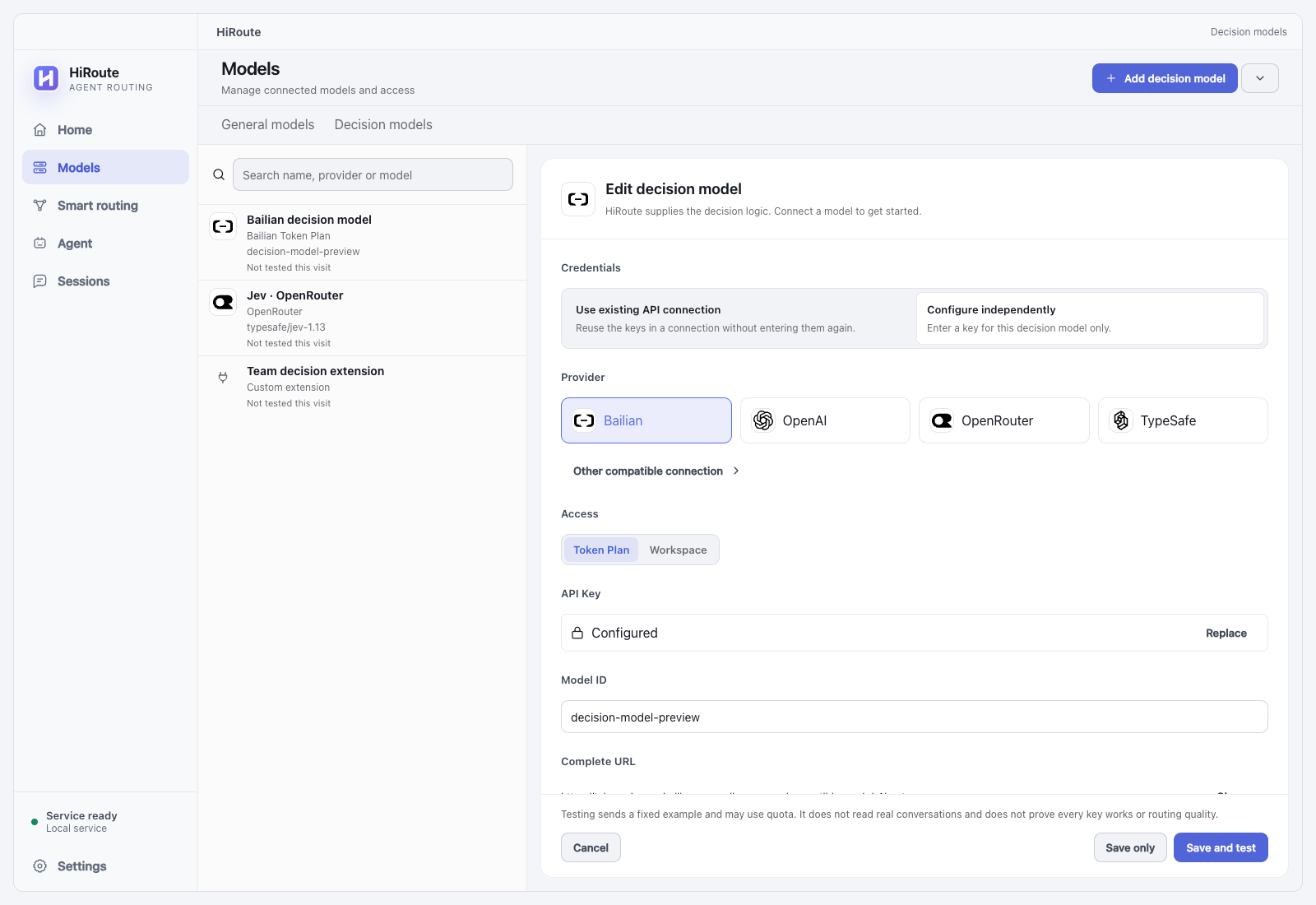
Save and test saves first, then tests that exact saved connection revision. The test sends fixed synthetic input and may consume provider quota. It reads no real conversation, executes no task, and produces no quality score. Passing confirms connectivity and required response fields for that revision in this test; it does not establish task judgment accuracy or continuing health. A failed test may still follow a successful save; check the status in the details.
Every saved edit creates a new revision. A route pins its selected connection revision: saving r2 leaves a published route on r1 until you select r2 in the route and publish changes. Saving or testing a connection does not publish a route. Adding a connection from an unfinished route preserves the draft; publishing remains a separate action when you return. With an existing API connection, key or network changes in that connection apply to later calls without republishing; changing the model, URL or protocol creates a new revision.
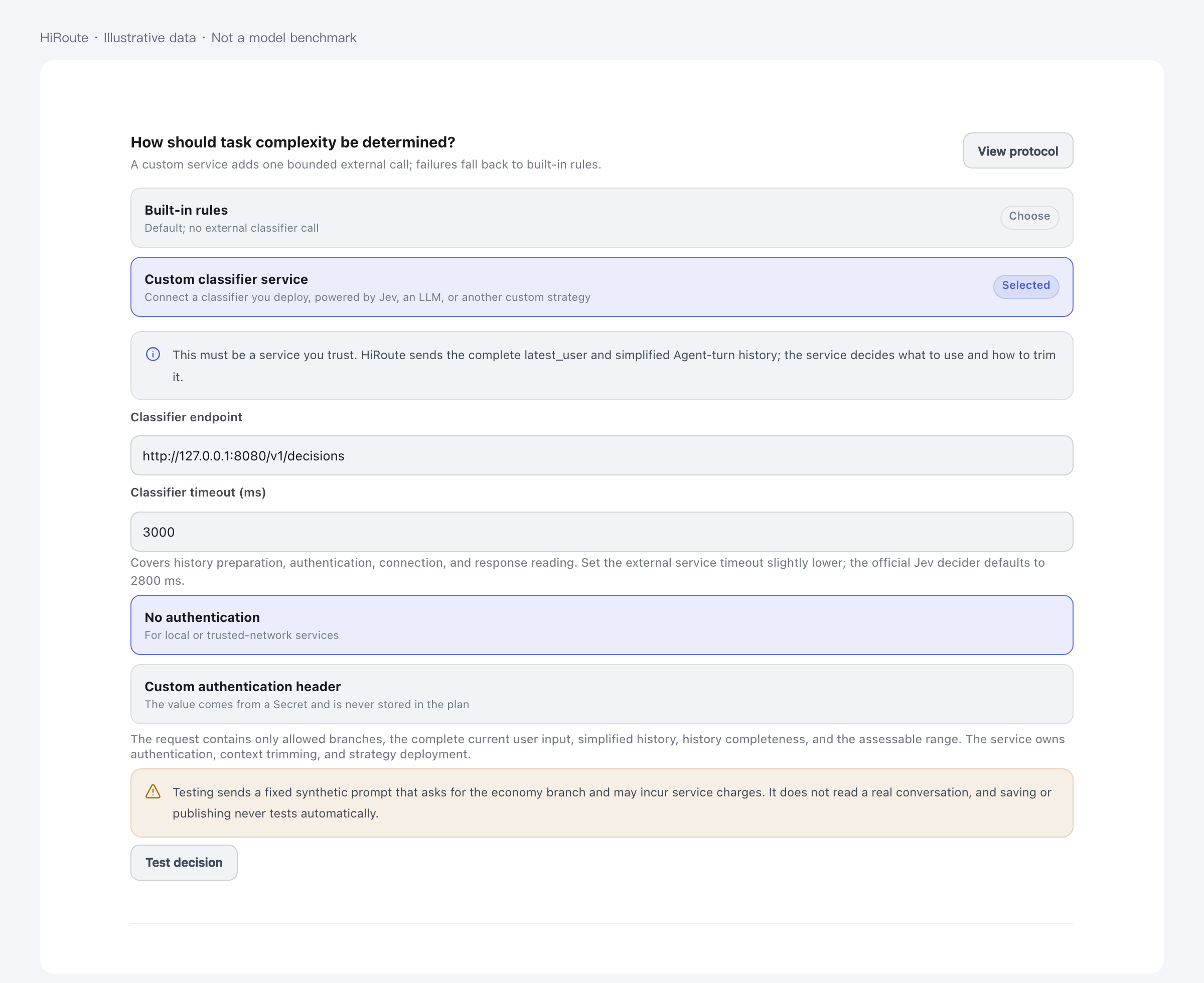
To choose categories and model groups with your own service, choose Connect custom extension from the add menu, enter its complete endpoint, and select authentication. Extensions implement the Custom extension API. See Connect decision models for built-in provider configuration and interface mapping. The optional self-hosted Jev reference extension provides deployment examples.
During real routing, the selected decision connection receives the complete current user content and allowed execution history. History includes user content, accepted assistant text, ordered tool names, and explicit coarse outcomes. The request body excludes system/developer prompts, tool arguments, tool-result bodies, and execution-model credentials. Assessment uses criteria frozen when the target stage executed. Incomplete visible history and an incomplete assessment target retain separate markers.
Configure Difficulty routing
With a custom extension, skip the trust and judgment-setting steps: the extension owns the group decision. The editor keeps only categories, conditions and candidates; parked settings return when switching to a built-in connection.
- Select Difficulty routing. Decision method defaults to Decision model; select the saved connection revision. You may instead choose Heuristic rules or Custom extension.
- Add models for explicit, bounded work to Regular models.
- Add models for complex tasks or protection after low competence to Primary models.
- Use Add model to add candidates to each group, then adjust their order. Open a model's reasoning settings when needed and apply or cancel the change.
With a decision model, Trust · how much goes to Regular sets how much work goes to regular models: further right sends more tasks to Regular. Choose one of the five presets, Trial, Familiar, Trusted, Hands-off and Entrusted, or enter an Exact value. The saved value is a simple-probability threshold, so simpler tasks go to Regular first. New plans default to Familiar, a threshold of 0.8. Entrusted is a threshold of 0, and applicable low-score protection still applies there. Trust changes only routing; agent permissions, tool approval and sandboxing do not change.
When you edit an existing route, Replay this setting on your records appears under Trust. It uses the last 7 days of the active published version to estimate how many stages would go to Regular at the new setting. It estimates past allocation; it is not a prediction. With enough evidence, Home also suggests stepping trust up or down; see Try a new model.
Judgment settings starts collapsed, with a competence floor of 0.5. Expand it to edit What counts as simple or complex, and How competence is assessed, including assessment instructions and the 0 / 0.5 / 1 criteria. An applicable complete previous-stage score below the competence floor selects primary for this turn.
Simple probability describes this turn's task degree, not the probability that an execution model will answer correctly.
Heuristic rules use task signals to classify simple or complex work and produce no model competence score. Trust and assessment prompts are hidden in that mode. Switching methods and returning preserves the selected connection and judgment draft.
Configure Custom branches
Select Custom branches to assign different models to tasks such as writing and reviewing. Two branches are provided initially; add more when needed:
- Give each branch a name and Task condition, such as “Draft or rewrite an article from supplied materials” or “Review an existing article and suggest changes.” Conditions describe task categories; put simple and complex criteria in Judgment settings.
- Add Regular models. For two groups, choose Add primary models (optional) and add candidates. A branch with regular models only skips degree judgment but can still record competence for observation.
- Expand Plan default judgment at the bottom to set shared thresholds, degree prompts, and assessment criteria.
- Branches follow plan defaults. To use different criteria, expand the branch's Judgment settings and choose Customize. Choose Restore plan defaults to follow the plan again.
Each branch with primary models has its own Trust control. Adjusting trust on a branch gives that branch its own judgment settings.
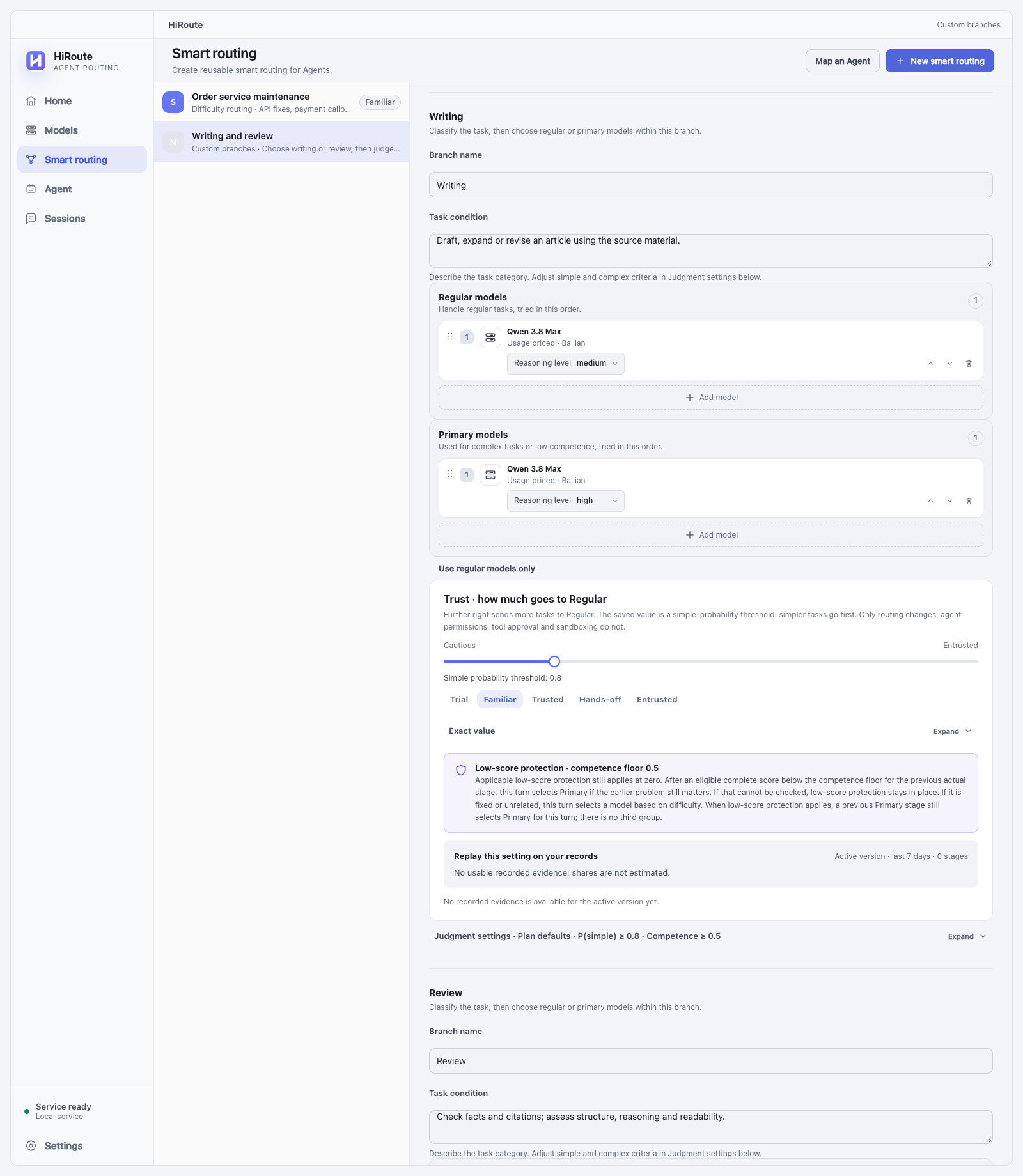
Customize copies the complete effective settings and makes the whole set independent, including thresholds, degree prompts, and competence criteria. Restore plan defaults removes the complete override and immediately follows the plan again, preserving the branch name, task condition, and models. A branch without primary models shows competence settings only; degree settings appear after primary models are added.
Each decision selects one task branch. Overlapping conditions follow the current main intent. If none matches, use the separately configured Default branch, then apply that branch's degree result. A low writing score remains attached to the writing stage; it cannot trigger primary review models merely because this turn asks for a review.
Understand turn selection and failures
With a decision model, each new message gets three independent answers along the task's timeline: how the last step went (competence score), how hard this step is (simple probability), and whether the last step's problem carries into the next (earlier problem relevance). HiRoute applies your route settings to choose and run the group.
In Difficulty routing and Custom branches, a task with two model groups selects regular only when this turn's simple probability meets its threshold and no applicable low score is present. Otherwise, primary is selected. With the defaults for a new plan, simple probability must reach 0.8; competence 0.5 meets the floor, and a score below 0.5 triggers protection.
Protection requires a fresh, complete, valid assessment returned by this decision, bound to the preceding actual execution stage and compatible with the current category, published configuration, and assessment criteria. Missing, partial, cross-category, or unattributable scores cannot trigger protection. Unrated is not zero, and an old low score is not repeatedly applied.
For valid difficulty, eligible low-score protection is evaluated for simple and complex work. Earlier problem relevance below 0.5 means the last step's problem does not carry into this one. It releases only the historical constraint: the difficulty selection still applies, so complex work remains Primary. Unavailable relevance retains protection. A preceding Primary stage may also trigger protection, without creating another group.
A new usable request can choose again. An earlier primary selection does not lock later turns to primary. Tool continuations inherit a reusable captured decision when native evidence identifies the same task. Known summaries and auxiliary calls stay outside main task history.
Smart routing does not require perfect proof that a wire User came from a human. If origin is uncertain, HiRoute classifies observed input, records the actual accepted result with an explicit source-uncertainty marker, and retains cross-turn evaluation. Such requests use separate history from verified adapter input. Classification failure can temporarily fall back under the existing plan rules; it does not disable later requests in the session.
Gateway restart loses its in-memory execution history. The next usable request starts capture again in the same native session, including a compressed Codex thread. Earlier summaries are not imported as accepted execution. A following question can evaluate newly captured output; older uncaptured context remains partial.
Source and scoring limits remain distinct from routing availability:
- Claude Code and Hermes may expose synthetic notifications as User input. These are observed requests, not verified human tasks. Task association and scoring can be inaccurate even while routing and evaluation continue.
- Qoder cannot reliably distinguish main, child and background calls sharing its identity. Classification, selection, history and evaluation remain enabled with that association limitation.
- Pi, DeepSeek Harness and OpenCode use their native adapters for stronger task boundaries. Missing or failed optional provenance permits observed-input routing; reapplying the connection installs the current owned adapter. Explicitly identified synthetic continuations still cannot replace a missing original task.
- Opaque peer context and unsupported native producer versions do not prove input origin or provider-cache affinity. They do not permanently disable routing on usable input.
A real A-to-B acceptance must show valid decisions and captured history on both requests, evaluation of A's actual execution on B, and actual selection of different model groups. Successful output or empty history alone is insufficient. This availability check does not establish scoring accuracy.
Candidate order provides failure relay. Exhausted regular candidates continue to the primary group in the same task branch; exhausted primary candidates fail explicitly. A direct primary selection tries only primary candidates, without downgrading to regular or crossing task branches. A branch with one group fails when that group is exhausted. A failed candidate call is not a competence judgment and produces no zero score.
When usable input is available, a two-group branch with a valid category but unavailable degree result uses that branch's primary group and records a degree judgment failure. If the whole decision fails, Difficulty routing uses heuristic rules; Custom branches uses the default branch's primary group, or regular when it has one group only. Known summary calls without an independent task do not acquire human provenance through heuristic rules.
All candidates must satisfy the request's text, image, tool, and context requirements. Once response delivery begins, HiRoute does not silently switch models within that response.
Publish and connect an agent
Select Enable or Publish changes to freeze the connection revision, task conditions, judgment settings, model order, and reasoning configuration. Missing models or connections and invalid judgment settings block publication. Invalid fields in collapsed sections are expanded and located.
Then open Agent, choose the target agent, enable Model routing, select this route, and reload the agent as the page describes. Quickstart explains how each agent connects. After saving, submit a small real task to verify the model path.
The route's Context and wait time settings:
- Context window: automatic by default, using at most 400,000 tokens and bounded by the limit shared by all candidates. You can set a custom window. Larger windows may increase context and cache costs.
- Maximum wait per request (seconds): includes retries and streaming output, and defaults to 1 hour for new plans. A slow response is interrupted at this deadline. Request writing, waiting for the first response byte, and stream idleness each default to 10 minutes. Existing plans retain their saved value. This does not change the model's own maximum output length.
- Allow parallel tool calls in Codex: under Advanced settings, on by default. Turn it off for models that do not support it; HiRoute then disables parallel calls in requests.
After you change these settings and publish, save the agent model settings again and restart the client to load the updated window and tool capabilities.
Inspect the outcome
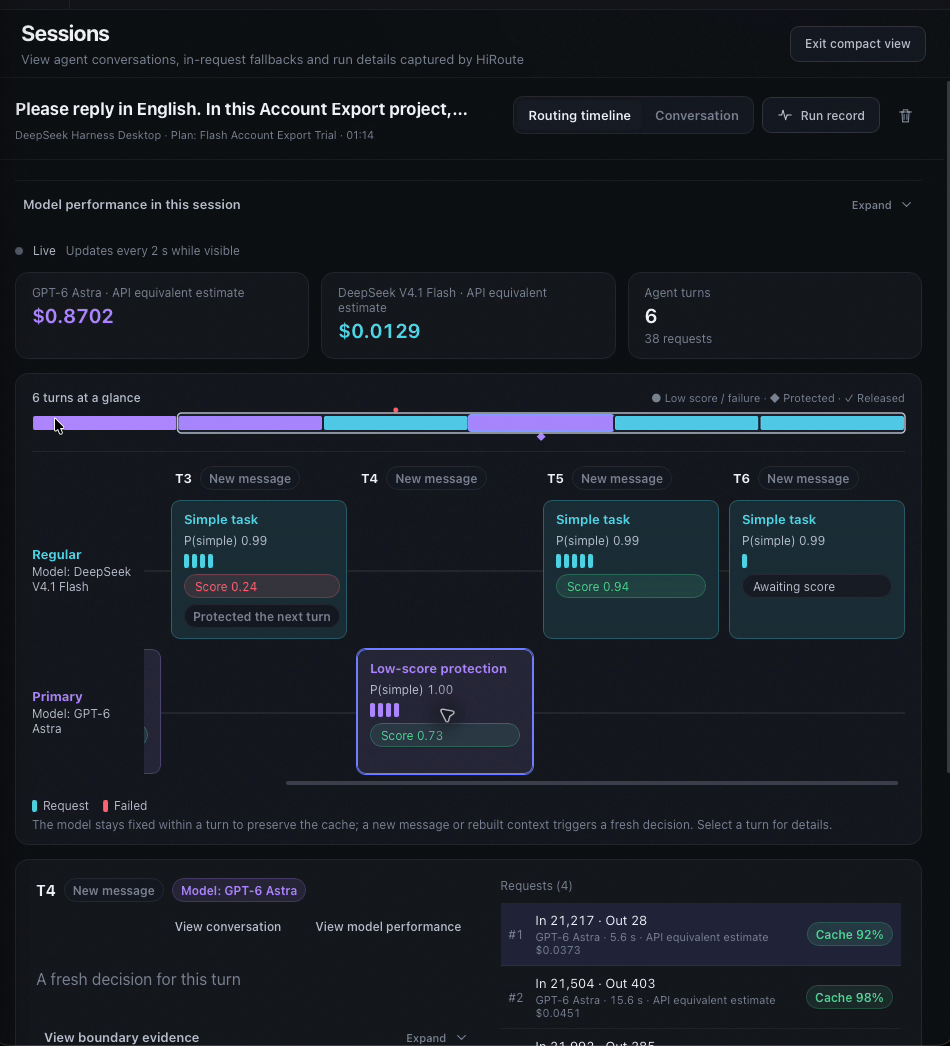
Open a session in Sessions. The Routing timeline shows, turn by turn, the group and model actually used, simple probability and stage scores, and where low-score protection applied and was released. Select a turn to see the selection basis at the start of that stage, plus each request's usage, cache hits and API-equivalent estimate. View conversation switches to the conversation, and View model performance opens the route's model performance.
Open Model performance on the route to inspect stage samples and competence coverage by actual task branch, model group, model, and reasoning settings. Difficulty routing groups Regular / Primary. Custom branches groups positions such as Writing → Regular / Primary. The same model used in different groups is recorded separately.
Open View assessment evidence or Stage details, then locate the session evidence and check these facts separately:
- Turn selection: task category, simple probability, the threshold at that time, selected group, and reason. Degree is not applicable when no judgment was needed and unavailable when it failed; neither means zero probability.
- Actual execution: the model and reasoning configuration actually used, candidate position, and any failure relay.
- Later assessment: a subsequent decision's score for this completed stage, its saved criteria, coverage, and completeness. Applicable low-score protection points to the old stage it assessed.
New drafts cannot rewrite past selection or thresholds. Read missing and partial scores with their coverage; HiRoute never rewrites a plan automatically because of one low score.